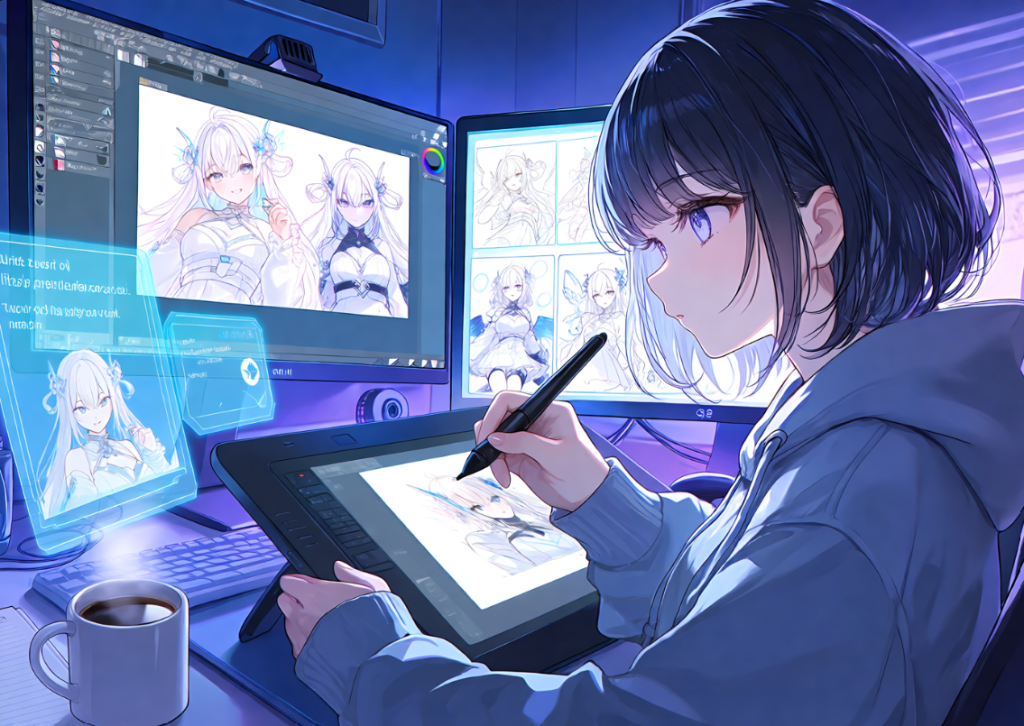
Ask any solo indie developer where their project stalls, and the answer is rarely code. It’s art. A single RPG might need dozens of character portraits, NPC variations, enemy designs, and promotional images — and for a team of one or two people with no dedicated artist, that workload alone can stretch a six-month project into two years.
AI-generated art has become a genuine part of the solution — not as a replacement for skilled artists, but as a way to close the gap between what a small team can imagine and what a small team has the hours to produce. This guide walks through how indie developers are actually using an AI game asset generator like PixAI in real production pipelines, from early concept art through exportable sprite references, along with the licensing questions, engine workflows, and realistic trade-offs that come with it.
Why Game Asset Creation Is a Bottleneck for Indie Developers
Indie teams operate under constraints larger studios simply don’t face. Budgets are small, art teams are often nonexistent, and every character, enemy, and background needs to get produced without the luxury of a dedicated illustration department.
Commissioned art is expensive and slow — a single polished character commission can take a freelance artist days to weeks, and a game with a full cast multiplies that cost quickly. Character consistency compounds the problem: keeping a protagonist’s design stable across dozens of scenes, poses, and expressions requires either a very disciplined art pipeline or a very patient artist.
This is where AI fits in — not as a replacement for artistic judgment, but as a workflow accelerator. Used well, AI generation lets a solo developer produce usable concept art, placeholder assets, and even production-ready character art in a fraction of the time a fully manual pipeline would require, while leaving creative direction firmly in the developer’s hands.
Can You Use AI-Generated Art in Your Game?
This is one of the first questions every developer asks, and the honest answer is: it depends on the platform’s terms of service and how you use the output.
Most AI art platforms, including PixAI, grant users commercial usage rights to the images they generate, subject to the platform’s specific terms — which generally means you can use AI-generated art in a commercial game you sell or monetize. Copyright ownership of AI-generated images is a more complex and still-evolving legal area in many jurisdictions, so developers publishing a commercial title should review the platform’s current terms of service directly before launch.
A more practical concern than copyright ownership is originality. Avoid prompting for copyrighted characters or recognizable intellectual property — a design that’s clearly a reskin of an existing franchise character can create real trademark and copyright exposure regardless of how it was generated. Keep character designs original, even when using AI to speed up the exploration process.
This article provides a practical overview, not legal advice. If your game is a commercial release with real revenue at stake, a brief consultation with an IP attorney before launch is a reasonable precaution.
Types of Game Assets You Can Create with AI
AI generation isn’t equally effective across every kind of game art. It tends to excel at:
• Character portraits for dialogue boxes, menus, and character select screens
• NPCs, especially when you need many visually distinct but stylistically consistent background characters
• Enemy concepts for factions, monster variants, and boss designs
• Character illustrations for cutscenes, endings, or promotional key art
• Background art and environment concepts
• UI concepts like icon sets, menu backgrounds, and loading screens
• Promotional artwork for store pages, trailers, and social media
• Concept art used purely for internal creative direction
Where AI is weaker: pixel-perfect sprite animation, tileset-level technical consistency, and any asset that needs exact, frame-by-frame control. These usually still benefit from manual refinement even after AI generates the starting point.
Workflow #1 — Character Design for RPGs, Visual Novels, and Story-Driven Games
A practical character design workflow generally follows this sequence:
1. Define the character archetype — role, personality, and visual theme before writing a single prompt
2. Write a base prompt describing physical traits, outfit, and art style
3. Generate multiple concepts to explore variations before committing to a final design
4. Create expression variants — happy, angry, sad, neutral — once the base design is locked
5. Generate pose variations for dialogue scenes, battle stances, or cutscene moments
6. Refine the artwork through inpainting or targeted edits to fix small inconsistencies
7. Prepare sprite references by exporting clean, transparent-background versions for engine import
Developers building a full cast should master batch generation workflows for consistent game character assets, since generating expressions, poses, and outfit variants one at a time quickly becomes the slowest part of the pipeline once you’re managing more than two or three characters.
Workflow #2 — Enemy and NPC Generation at Scale
Enemies and background NPCs are where AI generation delivers the clearest time savings, simply because of volume. A dungeon crawler might need fifteen enemy variants; a town hub might need thirty visually distinct townsfolk.
The efficient approach is to build prompt templates — a consistent structure covering faction, silhouette, and color palette — then swap specific details (weapon type, armor color, accessory) to produce variations that still read as part of the same visual family. This keeps enemy factions coherent even when you’re generating dozens of individual designs, and it speeds up preparing artwork for later animation work, since base poses and proportions stay consistent across the set.
Workflow #3 — Concept Art During Pre-Production
Before committing to a final art direction, AI generation is genuinely useful as an ideation tool. Teams can rapidly generate mood boards, environment concepts, and character exploration sketches to align on tone before any “final” art gets produced.
This matters more than it sounds for small teams: when there’s no dedicated art director, fast visual exploration helps a developer, or a two-person team, agree on direction quickly, rather than discovering a mismatch in creative vision halfway through production.
Integrating AI Assets into Unity, Godot, and Unreal
Getting AI-generated art into your engine follows the same fundamentals regardless of which engine you use.
• Export resolution — generate at higher resolution than your final target and downscale, since downscaling preserves quality better than upscaling a low-resolution source
• Transparent backgrounds — use background removal (built into most editing tools, including PixAI’s editor) before importing character art, so sprites don’t carry unwanted background elements into the scene
• Recommended texture sizes — common targets are 512×512 for smaller UI or portrait elements and 1024×1024 for larger character sprites or key art, though your specific engine and target platform (mobile vs. desktop) should guide the final call
• Sprite sheet preparation — for animated characters, AI-generated poses typically serve as reference frames or base art that’s then assembled and cleaned up in a sprite sheet tool rather than imported directly as animation-ready frames
Unity, Godot, and Unreal all handle standard PNG imports with transparency without any special plugin requirements, so the core workflow — generate, edit, export, import — stays largely engine-agnostic.
Maintaining Character Consistency
Consistency is the single biggest technical challenge in AI-assisted game art, and it’s also where the workflow separates hobby projects from production-ready pipelines. The most reliable tools for consistency are:
• Reference images — feeding a locked character design back into the generator for every new pose or expression
• Character sheets — a single reference document showing the character from multiple angles that the AI can draw from
• LoRAs — training a small custom model on a specific character so it reproduces the same face, proportions, and outfit reliably
• Costume and art-style consistency checks — reviewing batches for drift before finalizing
Developers building a roster of multiple characters should use reference images and LoRA for visual consistency across your character roster, since relying on prompt text alone tends to produce noticeable drift in facial features and proportions across a large cast.
Speed vs. Quality: Setting Realistic Expectations
AI generation is genuinely excellent for prototypes, concept art, placeholder assets, and stylized artwork that doesn’t require pixel-perfect precision. For a game jam, an early prototype, or a visual novel with a distinct anime aesthetic, AI-generated art can realistically serve as final production art.
Where manual refinement still tends to add real value: hero characters that appear in marketing and box art, UI assets that need exact pixel alignment, promotional artwork intended for a store page or trailer, and any final production polish where a human artist’s eye catches subtle issues an AI pass won’t. AI is a powerful accelerator, not a wholesale replacement for professional illustration, particularly on assets that carry the most visual weight in your game — and it isn’t a substitute for a dedicated art team on larger, AAA-scale productions.
Licensing and Attribution
Before publishing a commercial game built with AI-generated assets, review the specific platform’s terms of service regarding commercial use, asset ownership, and any attribution requirements. Documentation matters here too — keeping records of which assets were AI-generated, when, and under which platform terms can save real headaches if licensing questions come up after launch, particularly for larger commercial releases or console submissions that may ask about asset provenance.
Trademark risk deserves separate attention from copyright: even an AI-generated design can create legal exposure if it too closely resembles an existing, recognizable character or brand. Original character design remains the safest approach regardless of the tool used to produce it.
Cost Comparison: AI vs. Freelancers vs. Asset Packs
| Approach | Typical cost | Production speed | Customization & scalability |
| AI generation | Low — subscription or credit-based | Fast — minutes per concept | High creative control; excellent for volume |
| Freelance commissions | High — per-piece or per-hour rates | Slow — days to weeks per piece | Highest fidelity, but limited by artist availability |
| Asset marketplaces | Low to moderate — one-time purchase | Instant | Low customization; good scale, but generic |
AI generation tends to land between freelance commissions and asset packs: more customizable than a pre-made pack, and considerably faster and cheaper than a full freelance pipeline, though it still benefits from the same creative direction a freelancer would bring — a tool is only as good as the prompts and edits guiding it.
Example Workflow: Building Assets for an Indie Game
Consider a visual novel needing 5 main characters, 10 NPCs, and a set of promotional artwork.
• Planning — lock character archetypes, personalities, and rough visual direction for all 15 characters before generating anything
• Generation — create base designs for the 5 mains first, since they’ll appear most often and need the most refinement, then generate NPC variations in batches using shared prompt templates
• Editing — inpaint fixes for any anatomical or stylistic inconsistencies, and finalize expression sets for the main cast
• Export — prepare transparent-background PNGs at consistent resolutions for all finalized assets
• Integration — import into the engine, test in actual dialogue and UI contexts, and revise anything that doesn’t read well at in-game scale
A project of this size realistically takes days rather than weeks for the art pipeline alone when using AI generation, though exact timelines vary widely based on team size, revision cycles, and how much manual polish each asset receives.
Using AI During Game Jams
Game jams — often 48-hour sprints — are one of the clearest use cases for AI-assisted art. With almost no time for traditional art production, AI generation lets solo participants and small teams get usable placeholder or even final art without spending half their limited hours on illustration.
The priority during a jam should stay on gameplay, with AI generation used to quickly fill visual gaps rather than to chase perfect artwork. Style consistency matters less under jam time pressure — a cohesive color palette and consistent prompt structure across assets usually reads as “intentional” even without perfect character consistency.
Combining AI with Traditional Art
The most effective indie teams rarely treat this as an either/or decision. A common, sustainable pattern combines AI generation for volume — NPCs, background characters, rapid concepting — with freelance artists or asset packs for hero assets and final polish, and manual touch-ups to unify everything stylistically.
This lets a small team allocate their limited art budget toward the handful of assets that matter most — box art, main character portraits, key promotional pieces — while using AI to cover the long tail of NPCs, variations, and background material that would otherwise consume disproportionate time and money.
Final Thoughts
AI game asset generation doesn’t replace the craft of game art — it changes where a small team’s limited hours get spent. Used deliberately, tools like PixAI let indie developers prototype faster, iterate more freely, and produce a consistent visual cast without needing a full-time artist on staff, while freeing up the creative decisions that matter most — art direction, character design, final polish — for direct human attention.
If you’re building a game with limited art resources, the practical next step is simple: pick one character, run it through a full generation-to-export workflow, and see how it feels inside your actual engine before committing to AI across your whole asset list.

Find Trusted Cardiac Hospitals
Compare heart hospitals by city and services — all in one place.
Explore Hospitals
PakarPBN
A Private Blog Network (PBN) is a collection of websites that are controlled by a single individual or organization and used primarily to build backlinks to a “money site” in order to influence its ranking in search engines such as Google. The core idea behind a PBN is based on the importance of backlinks in Google’s ranking algorithm. Since Google views backlinks as signals of authority and trust, some website owners attempt to artificially create these signals through a controlled network of sites.
In a typical PBN setup, the owner acquires expired or aged domains that already have existing authority, backlinks, and history. These domains are rebuilt with new content and hosted separately, often using different IP addresses, hosting providers, themes, and ownership details to make them appear unrelated. Within the content published on these sites, links are strategically placed that point to the main website the owner wants to rank higher. By doing this, the owner attempts to pass link equity (also known as “link juice”) from the PBN sites to the target website.
The purpose of a PBN is to give the impression that the target website is naturally earning links from multiple independent sources. If done effectively, this can temporarily improve keyword rankings, increase organic visibility, and drive more traffic from search results.